AI agents often look impressive in demos but fail when exposed to real users, live data, unclear instructions, and business constraints. The issue is usually not the model alone. It is the lack of supporting architecture. This article explains the nine layers that make agents more reliable, observable, and useful in real-world workflows.
A few months ago, an AI agent that looked impressive during testing started behaving badly once real users began using it. In the demo environment, it handled simple requests well. It answered quickly, used tools when required, and gave the impression of being ready for serious work. But once it met live data, unclear instructions, edge cases, and impatient users, the cracks appeared.
It began looping on vague requests. It called tools more often than necessary. Costs rose quietly in the background. Some answers sounded confident but were not fully grounded. The model itself was not the main problem. The weakness was the structure around it.
This is where many teams go wrong. They treat an agent as a strong model with a few tools attached. That may be enough for a demo. It is rarely enough for a real workflow. A dependable agent needs more than intelligence at the center. It needs boundaries, memory, planning, verification, observability, and a way to recover when things go wrong. The model may be the brain, but the architecture is the body, nervous system, immune layer, and operating discipline around it.
That is why thin agents keep failing. They are not failing only because language models make mistakes. They fail because the supporting layers are too shallow.
The Hidden Cost of Shallow Architecture
Most agent projects begin in a familiar way. A team selects a capable model, writes a few strong prompts, connects two or three tools, and builds a simple user interface around it. The early results look promising. The agent answers questions, performs actions, and creates the feeling that a useful product is close.
This approach is good for experimentation. It helps teams move fast and learn quickly. The problem starts when the same prototype is pushed into real usage without enough structural depth.
Lightweight agents usually break in predictable ways. They lose track of context during longer tasks. They repeat actions because they do not know when to stop. They use expensive models for simple decisions. They fail silently when a tool returns bad data. They produce answers even when the available evidence is incomplete. In sensitive workflows, they may also handle information or decisions without proper controls.
These issues are not small technical inconveniences. They directly affect trust, cost, adoption, and compliance. A user may forgive one slow response. They may not forgive an automation that takes the wrong action. A business may tolerate experimentation during a pilot. It will not scale a tool that cannot explain why it behaved a certain way.
This is the real gap between a demo and a dependable product. The demo proves that the model can respond. Real usage proves whether the full architecture can behave responsibly under pressure.
The 9-Layer Approach
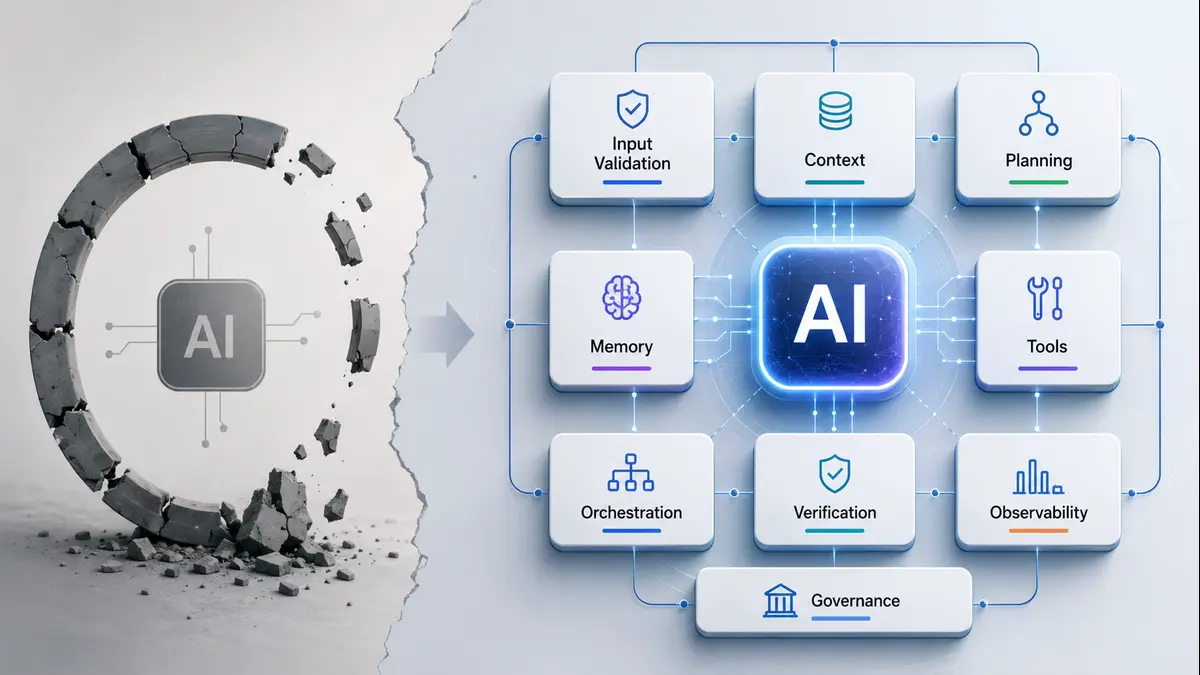
A stronger agentic stack can be understood through nine layers. These layers are not meant to make development unnecessarily complicated. They exist because real-world work is messy. Users are unclear. APIs fail. Data is incomplete. Costs matter. Compliance matters. Human review matters. And in many cases, the final answer is less important than whether the path taken to reach it was safe, traceable, and useful.
The nine layers can be grouped into three broad areas: input and brain, execution, and defense and trust.
Input and Brain Layers
1. Input Validation and Sanitization Layer
Every workflow begins with input. That input may come from a user, a document, an API, an email, a form, or another application. It may be incomplete, noisy, badly formatted, or ambiguous. A shallow agent passes this raw input directly to the model and hopes the model will understand it. A better design first checks and structures the input.
This layer can validate formats, remove unnecessary noise, detect missing fields, classify intent, and reject requests that should not proceed. In software terms, this may involve JSON schema validation, Pydantic models, Zod validation, rule-based checks, or simple business logic.
This does not make the agent less intelligent. It makes it more disciplined. A model should not be forced to guess everything. If the request is missing a date, customer ID, document type, or required parameter, the application should detect that early. Clean input reduces downstream confusion and prevents avoidable failures.
2. Context Intelligence Layer
Context is one of the most misunderstood parts of agent design. Many teams assume that more context means better performance. So they keep adding documents, chat history, database results, and tool outputs into the prompt. This often increases cost and reduces clarity.
The real question is not: “How much context can we send?” The better question is: “What does the model need to know right now?”
This layer decides what should be included, what should be ignored, what should be summarized, and what should be refreshed before the next step. For retrieval-based products, this may involve chunk ranking, reranking, summarization, deduplication, and source filtering. For workflow applications, it may involve maintaining only the most relevant task state instead of carrying the entire conversation forward. A good context layer keeps the agent focused. It prevents the model from drowning in information.
3. Reasoning and Planning Engine
A basic agent often jumps straight from request to response. That works for simple questions. It does not work well for multi-step work. A stronger design separates planning from execution.
Before taking action, the agent should identify the goal, break it into steps, decide which tools are required, and define what success looks like. This can be done using planner-executor patterns, workflow graphs, state machines, or structured reasoning templates.
For example, if the task is to analyze a supplier contract, the agent should not immediately generate a summary. It should first determine whether it needs to extract clauses, compare obligations, check renewal terms, identify risks, and produce a final recommendation. Planning does not need to be fancy. Even a simple checklist can improve reliability. The point is to prevent the model from improvising every step.
4. Memory and Continuity Layer
Many early agents treat every interaction as a fresh event. That makes them forgetful and repetitive. In real workflows, continuity matters. A useful assistant should remember previous decisions, user preferences, project context, and task history where appropriate. Memory can exist at different levels.
Short-term memory helps within the current task. Long-term memory stores stable information across sessions. Task memory records decisions, outcomes, and unresolved items. Organizational memory can connect the application to documents, policies, and prior work. But memory also needs discipline. Not everything should be stored. Sensitive information needs controls. Old information should be updated or removed when it becomes stale. A good memory layer does not simply remember more. It remembers carefully.
Execution Layers
5. Tooling and Action Interface
Tools turn a conversational interface into something that can actually do work. These tools may include APIs, databases, search engines, calculators, ticketing platforms, CRMs, ERPs, code execution environments, or internal services. The moment tools are added, the agent moves from answering to acting.
That shift is important. When an agent can take action, tool design becomes critical. Each tool should have a clear purpose, typed inputs, predictable outputs, error handling, timeout limits, and permission boundaries.
A weak tool layer creates fragile behavior. The agent may call the wrong function, send incomplete data, retry endlessly, or fail without explanation. A strong tool layer makes action safer. It tells the agent what can be done, how it should be done, and what to do when something goes wrong.
6. Orchestration and Flow Control
Complex workflows require coordination. Without orchestration, an agent may try too many things at once, move in the wrong order, or continue working even after it should stop. This is one reason some agents loop or create unnecessary cost. Orchestration defines the flow.
It decides which step comes next, when to use a tool, when to ask a human, when to stop, and when to retry. This can be handled through routing logic, graph-based workflows, queues, state machines, or dedicated orchestration frameworks.
The best designs combine flexibility with boundaries. They allow the model to reason where useful, but they do not let every workflow become an open-ended adventure. Serious applications need creativity, yes, but they also need traffic rules. Even the best driver needs lanes.
Defense and Trust Layers
7. Self-Reflection and Verification
Many teams add a final prompt that says, “Check your answer before responding.” That is a start, but it is not enough. In serious workflows, verification should be more structured.
The agent should check whether the response matches the original objective. It should verify important claims against retrieved evidence. It should confirm tool results. It should apply deterministic rules where possible. In some cases, another model or process can review the output before it reaches the user. This layer is especially important when the answer affects decisions, money, legal interpretation, technical operations, or customer communication. The goal is not to make the model “think magically.” The goal is to create a quality gate before the response is delivered. A forward-only agent produces. A verified one checks before it produces.
8. Observability and Live Evaluation
If an agent fails and no one can see why, improvement becomes guesswork. Observability gives teams visibility into what is happening inside the workflow. It tracks prompts, tool calls, latency, cost, errors, retries, user feedback, and final outcomes. This is where many teams underestimate the work. Logs are not enough. A serious product needs useful signals.
Some important metrics include:
| Metric | What It Reveals | Why It Matters |
|---|---|---|
| Task success rate | Whether the user’s objective was completed | Measures real usefulness |
| Cost per successful task | Total spend required for one completed outcome | Better than only tracking token cost |
| Loop rate | Repeated reasoning or tool-call cycles | Detects wasted execution |
| Tool failure rate | API, database, or integration failures | Shows weak external dependencies |
| Human escalation rate | How often people need to step in | Helps tune automation boundaries |
| Context hit rate | Whether retrieval brings useful information | Improves grounding and relevance |
| P95 latency | Response time for slower user experiences | Protects usability at scale |
| Unsupported-claim rate | Claims not backed by available evidence | Critical for trust-heavy use cases |
These metrics turn vague complaints into actionable information. Instead of saying, “The agent is unreliable,” a team can say, “Most failures happen when retrieval returns weak context,” or “The cost spike is coming from repeated tool retries.” That difference matters.
9. Governance, Safety, and Human Oversight
The final layer is about responsibility. Not every task should be fully automated. Some actions require approval. Some data should not be exposed. Some decisions should remain with humans. This is especially true in finance, healthcare, legal, industrial operations, hiring, insurance, and public-sector use cases.
Governance defines the boundaries. It includes access control, audit trails, data protection, approval workflows, escalation rules, and policy checks. It also defines what the agent is not allowed to do. This layer is not only about avoiding risk. It also increases trust. People are more likely to use a product when they understand its limits. Businesses are more likely to deploy it when they can audit decisions and keep humans in control where needed. The best designs do not remove humans from the loop entirely. They put humans in the right part of the loop.
Thin Agent vs Layered Agent
The difference between a thin build and a reliable one becomes clear when viewed side by side.
| Layer | Thin Agent | Layered Agent |
|---|---|---|
| Input | Sends raw prompts directly to the model | Validates, structures, and filters requests |
| Context | Pushes large amounts of information into the prompt | Selects, ranks, summarizes, and refreshes relevant context |
| Planning | Responds in one shot | Breaks the task into steps before execution |
| Tools | Uses basic API calls | Uses typed tools with retries, fallbacks, and error handling |
| Memory | Relies mostly on chat history | Maintains short-term, long-term, and task-specific memory |
| Flow | Lets the model decide everything dynamically | Uses routers, graphs, or state machines to guide progress |
| Verification | Trusts the output by default | Checks claims, actions, and tool results |
| Monitoring | Reviews failures manually after they occur | Tracks cost, latency, errors, and completion quality |
| Oversight | Adds human review late | Builds approval paths into risky workflows |
This is why many projects get stuck after the pilot stage. The prototype proves potential. The architecture proves durability.
A Practical Example: Industrial Operations
Consider an industrial operations assistant that receives a message like:
“Boiler efficiency dropped after last night’s load change. Can you check what may have happened?”
A thin agent may give a generic answer. It may mention fuel quality, excess air, heat loss, load variation, or instrumentation error. The answer may sound useful, but it may not be tied to actual plant data A layered agent behaves differently. First, it validates the request. Which boiler? Which unit? What time window? What load range?
Then it retrieves relevant operating data such as steam flow, fuel flow, flue gas temperature, oxygen percentage, GCV, feedwater temperature, and historical efficiency trends. The planning layer decides the diagnostic path. It may compare before-and-after load conditions, calculate efficiency changes, check sensor anomalies, and identify whether the issue is operational, fuel-related, or instrumentation-related.
The tool layer performs calculations. The orchestration layer controls the sequence. The verification layer checks whether the conclusion is supported by data. If the deviation crosses a threshold, the governance layer may flag it for engineer review instead of giving a final automated recommendation. This is the difference between an answer and a working assistant. The first one talks. The second one helps.
The Minimum Viable Agent Stack
Building all nine layers from day one may not be practical. Early teams need momentum. But skipping structure altogether is dangerous.
A good minimum stack should include:
| Capability | Practical Starting Point |
|---|---|
| Input control | Validate required fields and unsafe requests |
| Context handling | Select only relevant information for the task |
| Planning | Add basic step-by-step workflow logic |
| Tool use | Define typed tools with error handling and retry limits |
| Observability | Track cost, latency, failures, and tool calls |
| Verification | Review important outputs before final response |
| Human oversight | Require approval for sensitive or irreversible actions |
This is enough to move from a clever demo to a serious pilot.
After that, teams can gradually improve memory, orchestration, governance, evaluations, and model routing. The right approach is not to build a heavy platform too early. The right approach is to avoid building a blind one.
The Economics That Matter
Thin agents often look cheaper at the beginning. They use fewer components and take less time to build. But the real cost appears later. If the agent repeats steps, uses expensive models for simple tasks, gives weak answers, or requires constant manual correction, the economics quickly weaken. The better metric is not cost per token. It is cost per successful task.
An agent that spends slightly more on planning but avoids three unnecessary tool calls may be cheaper overall. A product that uses a smaller model for classification and a stronger model only for complex reasoning may perform better at lower cost. A workflow with good context filtering may reduce prompt size without reducing quality.
This is where architecture becomes financial discipline. Reliable designs are not only safer. They are often more economical at scale because they waste less effort.
The Agent Maturity Ladder
Most agent projects pass through a few stages.
- The first is the demo stage. It works in controlled conditions and impresses people quickly.
- The second is the fragile pilot stage. It handles specific use cases but breaks when inputs become broader or workflows become longer.
- The third is the reliable deployment stage. It has enough structure to work with real users, real data, and real constraints.
- The fourth is the self-improving stage. It uses feedback, evaluation, and monitoring to improve over time with limited manual intervention.
Many projects stall between stage two and stage three. Not because the model is poor, but because the surrounding architecture is incomplete. To move forward, teams need to stop asking only, “Which model should we use?” They also need to ask, “Which layer is currently missing?”
The next phase of agent development will not be won only by better prompts or larger models. Those will help, but they will not be enough on their own. The tools that survive real usage will be the ones built with structure around intelligence. They will validate inputs before acting. They will manage context carefully. They will plan before execution. They will use tools responsibly. They will remember what matters. They will verify outputs. They will monitor behavior. And they will know when to involve humans. That may sound less glamorous than a dramatic demo, but it is how dependable software has always been built.
The old lesson still holds: strong foundations matter. Thin agents may impress in a demo. Layered systems are what earn lasting trust in production. The difference usually comes down to how seriously we treat the architecture around the intelligence.
Discover more from Poniak Times
Subscribe to get the latest posts sent to your email.