A step-by-step technical guide to building a LangGraph-powered AI web research agent, deploying it as a REST API service, and turning it into a monetizable marketplace product.
Artificial intelligence is rapidly moving beyond conversational chatbots and into autonomous task execution. Across research, operations, customer support, analytics, and software workflows, businesses are beginning to prefer systems that can independently gather information, make intermediate decisions, and return a usable result instead of a plain conversational reply.
This transition is creating demand for a new class of software product: the AI agent. Unlike a traditional LLM wrapper that simply generates text from memory, an AI agent can search, reason, act, observe outcomes, and iterate until a task is complete. Building such systems, however, requires more than prompt engineering. It requires a deterministic orchestration framework capable of managing state, tool execution, and conditional reasoning loops.
One of the most practical frameworks for this purpose today is LangGraph.
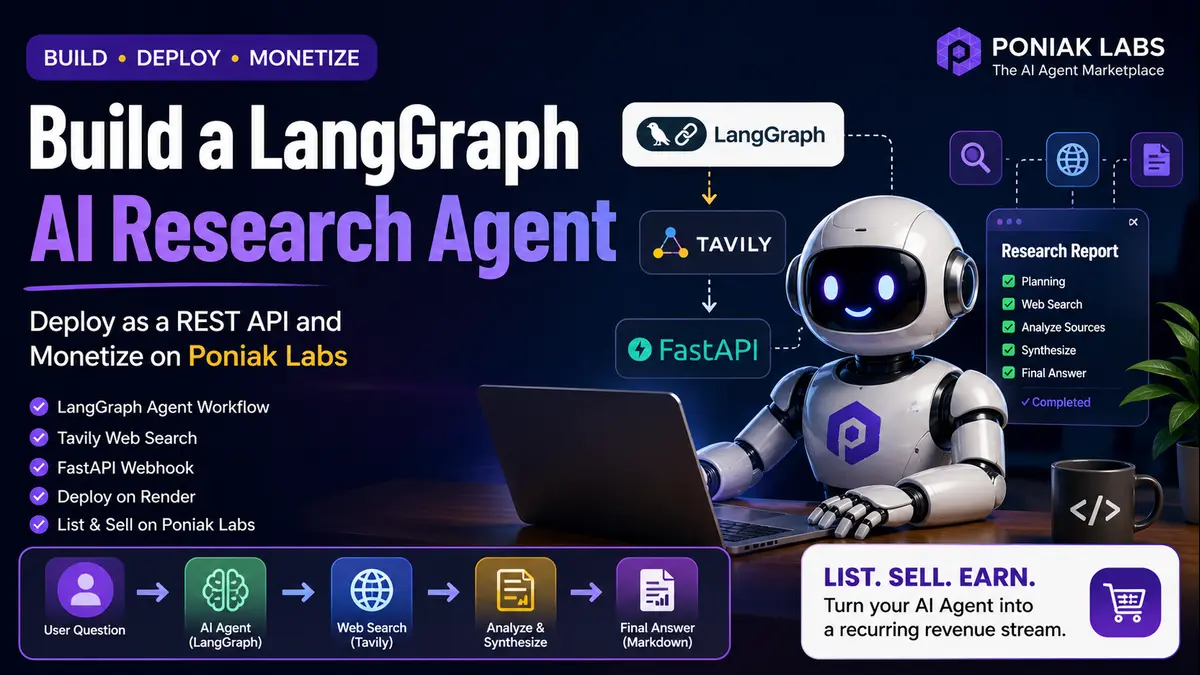
In this guide, we will build a fully functional Web Research Agent using LangGraph and Tavily Search. By the end, the same agent will be wrapped inside a FastAPI webhook, deployed on Render, and prepared for monetization through Poniak Labs.
What Exactly Is an AI Research Agent?
A research agent is fundamentally different from a normal search engine and also different from a standard chatbot.
A search engine returns a collection of links.
A chatbot returns a conversational answer based on model memory.
A research agent performs an autonomous workflow.
For example, if a user asks:
“What are the most significant AI agent frameworks released or updated in 2026?”
A normal chatbot may attempt to answer from static memory and produce a broader response. A research agent instead decides whether its memory is sufficient, searches the live web, compares multiple sources, refines its query if information is incomplete, and only then synthesizes a structured cited answer.
The distinction is not merely language generation – it is autonomous decision-making.
This behavioral pattern is commonly described through the ReAct framework:
- Reason – determine the best next action based on current knowledge.
- Act – call a tool, search the web, or retrieve information.
- Observe – inspect the tool output.
- Repeat – continue until the agent has enough evidence to answer.
Implementing this reliably with a single LLM prompt quickly becomes fragile. A framework is needed to preserve state across multiple iterations and route decisions conditionally. This is exactly where LangGraph becomes useful.
Why LangGraph?
Most AI agent frameworks attempt to simplify development by hiding the orchestration logic. That approach is convenient for prototypes but often problematic in production, because when the agent behaves incorrectly the developer has little visibility into why the failure occurred.
LangGraph takes a more explicit engineering approach.
It models the agent as a directed computational graph where:
- Nodes are Python functions representing steps or decisions.
- Edges are the routes connecting those steps.
- Conditional Edges determine where execution goes next depending on output.
- State is a shared memory object flowing through every node.
This design gives the developer full control over the reasoning loop. Every tool call, every LLM decision, and every state transition can be inspected and debugged. For production-grade agents that will eventually serve real paying users, this transparency becomes critical.
Prerequisites and Environment Setup
To build this project we would need:
- Python 3.10+
- OpenAI API key
- Tavily Search API key
Tavily is particularly useful for research workflows because it returns summarized web results along with relevant excerpts instead of only raw URLs.
We have to install the dependencies:
pip install langgraph langchain langchain-openai langchain-community tavily-python fastapi uvicorn python-dotenvCreate a .env file in the root directory:
OPENAI_API_KEY=sk-...
TAVILY_API_KEY=tvly-...
Load the environment variables:
from dotenv import load_dotenv
load_dotenv()
Step 1 – Defining the Agent State
In LangGraph, the agent’s working memory lives inside a shared state object. This state stores:
- the user’s original question,
- all LLM messages,
- tool calls,
- tool outputs,
- and eventually the final synthesized answer.
We define it using Python’s TypedDict.
from typing import TypedDict, Annotated, List
from langgraph.graph.message import add_messages
from langchain_core.messages import BaseMessage

class AgentState(TypedDict):
    messages: Annotated[List[BaseMessage], add_messages]
The add_messages reducer ensures that every new interaction is appended to the message history rather than replacing previous entries. This means the agent retains full conversational memory throughout the reasoning cycle.
Step 2 – Create the Web Search Tool
The agent now needs external access to current information. We provide this using Tavily Search and bind it as a LangChain tool.
from langchain_community.tools.tavily_search import TavilySearchResults
from langchain_openai import ChatOpenAI

search_tool = TavilySearchResults(max_results=3, include_answer=True)
tools = [search_tool]

llm = ChatOpenAI(model="gpt-4o", temperature=0)
llm_with_tools = llm.bind_tools(tools)
A few important notes:
max_results=3keeps the search concise and latency manageable.include_answer=Trueasks Tavily to provide summarized content snippets.temperature=0ensures deterministic and stable reasoning.
Once bind_tools() is applied, the LLM becomes aware that a callable search function exists. Whenever it determines additional information is required, it can output a structured tool call instead of plain text.
Step 3 – Building the Agent Node
The agent node acts as the decision engine.
Its job is simple: look at the current state, inspect everything that has happened so far, and decide whether to answer or search again.
def agent_node(state: AgentState):
    system_prompt = """You are a thorough and meticulous research assistant.

Your job is to answer the user's question using real, current information from the web.

Rules:
- If you are not confident in your answer, use the search tool.
- After searching, evaluate whether you have enough information to answer completely.
- If you still have gaps, search again with a refined query.
- When you are confident, write a clear, structured final answer and cite your sources.
- Do not fabricate information. Only report what you found."""

    response = llm_with_tools.invoke(
        [("system", system_prompt)] + state["messages"]
    )
return {"messages": [response]}Step 4 – Adding the Tool Node
The tool node executes any tool calls generated by the LLM.
LangGraph provides a built-in ToolNode abstraction for this.
from langgraph.prebuilt import ToolNode

tool_node = ToolNode(tools)
Whenever the last LLM message contains a Tavily search request, this node automatically:
- executes the query,
- captures the results,
- and injects them back into the shared state.
The agent therefore sees not just what it asked for, but also what the external world returned.
Step 5 – Wiring the Graph Together
This is where the explicit orchestration rules becomes visible.
from langgraph.graph import StateGraph, START, END
from langgraph.prebuilt import tools_condition

workflow = StateGraph(AgentState)

workflow.add_node("agent", agent_node)
workflow.add_node("tools", tool_node)

workflow.add_edge(START, "agent")

workflow.add_conditional_edges(
    "agent",
    tools_condition,
    {"tools": "tools", "__end__": END}
)

workflow.add_edge("tools", "agent")

research_agent = workflow.compile()
The routing logic is straightforward:
- Start with the agent.
- If the agent calls a tool, route to tools.
- Once the tools return output, route back to agent.
- If the agent no longer needs tools, terminate.
This creates a genuine iterative ReAct loop rather than a one-shot LLM completion.

Architecture overview of the LangGraph AI Research Agent, showing how user input flows through shared state, agent reasoning, Tavily web search, FastAPI deployment, and Poniak Labs REST API listing.
Step 6 – Running the Agent Locally
Now the graph has to be executed.
from langchain_core.messages import HumanMessage

inputs = {
    "messages": [
        HumanMessage(content="What are the most significant AI agent frameworks released or updated in 2026?")
    ]
}

for chunk in research_agent.stream(inputs, stream_mode="values"):
    last_message = chunk["messages"][-1]
    last_message.pretty_print()
You will now observe the agent behave autonomously:
- It reads the question.
- It triggers Tavily Search.
- It inspects the results.
- It may search again with a refined prompt.
- It finally produces a synthesized cited answer.
This is the practical difference between an LLM chatbot and a workflow-driven AI agent.
Step 7 – Wrap It Inside a FastAPI Webhook
A terminal script is not a sellable product. To expose this as a usable service, we need an HTTP endpoint. So we have to wrap it inside a FastAPI Webhook.
For this agent, the seller-side API route will be:
POST /runhttps://your-render-service-name.onrender.com/runCreate main.py:
from fastapi import FastAPI, HTTPException
from fastapi.responses import PlainTextResponse
from pydantic import BaseModel
from langchain_core.messages import HumanMessage
from dotenv import load_dotenv

load_dotenv()

from graph import research_agent

app = FastAPI(title="AI Research Agent by Poniak Labs")

class QueryInput(BaseModel):
    prompt: str

@app.get("/health")
def health():
    return {"status": "ok"}

@app.post("/run", response_class=PlainTextResponse)
def run_agent(payload: QueryInput):
    try:
        inputs = {
            "messages": [HumanMessage(content=payload.prompt)]
        }

        final_state = research_agent.invoke(inputs)
        last_message = final_state["messages"][-1]

        return last_message.content

    except Exception as e:
        raise HTTPException(status_code=500, detail=str(e))
This version returns the final answer as raw Markdown text, which makes it compatible with the Markdown rendering option inside Poniak Labs.
Test locally:
uvicorn main:app --reloadVisit:
http://localhost:8000/docsFastAPI will automatically generate Swagger documentation for testing.
Step 8 – Deploying on Render
Push the project to GitHub and connect it to Render.
Create render.yaml:
services:
  - type: web
    name: ai-research-agent
    runtime: python
    buildCommand: pip install -r requirements.txt
    startCommand: uvicorn main:app --host 0.0.0.0 --port $PORT
    healthCheckPath: /health
    envVars:
      - key: OPENAI_API_KEY
        sync: false
      - key: TAVILY_API_KEY
        sync: false
And requirements.txt:
fastapi
uvicorn
langgraph
langchain
langchain-openai
langchain-community
tavily-python
python-dotenv
Deployment steps:
- Push code to GitHub.
- Create a Web Service on Render.
- Connect the repository.
- Add
OPENAI_API_KEYandTAVILY_API_KEYas environment variables. - Deploy the service.
One practical note deserves attention here: because LangGraph agents may perform multiple LLM calls and multiple Tavily searches inside a single user request, developers should monitor response latency, timeout limits, and token consumption carefully. Conservative search depth and deterministic LLM settings help maintain stable buyer-facing performance.
Once deployed, your seller-side Target API URL will look like:
https://ai-research-agent.onrender.com/runReplace ai-research-agent with your actual service name.
A Quick Technical Note on API Key Management
Before exposing the agent commercially, developers should think carefully about API key management and usage control.
The OpenAI and Tavily API keys should never be exposed on the frontend or shared directly with buyers. They must remain securely stored as backend environment variables on the deployment platform.
Once real users begin sending requests, every invocation may trigger one or more LLM calls and one or more web search calls. Without proper limits, a single heavy user or poorly designed request loop can consume a large portion of the developer’s API budget.
For production use, it is advisable to maintain:
- request logging,
- token usage observation,
- conservative model settings,
- timeout monitoring,
- and sensible pricing relative to API consumption.
Developers who want an additional verification layer may optionally configure a secret auth header inside Poniak Labs and validate it inside their backend, but this is not required for a standard REST API listing.
In other words, building the agent is only the first step. Running it as a paid product requires cost awareness and usage discipline.
Step 9 – List It on Poniak Labs
Once the webhook is live, the agent becomes listable on Poniak Labs.
Choose:
Agent Type: REST API AgentSuggested listing configuration:
Agent Name: AI Research Agent — Web Search & Synthesis
Category: Data Analysis and Insights
Agent Type: REST API Agent
Target API URL: https://your-render-service-name.onrender.com/run
Output Type: Markdown
Suggested description:
A LangGraph-powered research agent that autonomously searches the web, evaluates source quality, and synthesizes a cited structured answer to complex research questions.
Suggested pricing:
- usage credits per run, or
- one-time fee plus usage credits depending on the commercial preference.
Input Schema:
[
  {
    "name": "prompt",
    "type": "textarea",
    "label": "Research Question",
    "required": true,
    "description": "Enter the research question you want the agent to investigate.",
    "placeholder": "e.g. What are the top AI agent frameworks in 2026?"
  }
]In this case, the FastAPI model is:
class QueryInput(BaseModel): prompt: str"name": "prompt"What Buyers Actually Receive
When a buyer submits a question, the buyer does not directly call the seller’s Render endpoint.
Instead, the flow works like this:
- The buyer opens the Playground or calls the Poniak Labs API proxy.
- Poniak Labs validates the buyer’s API key, credits, and agent access.
- The buyer’s payload is forwarded securely to the seller’s configured Target API URL.
- The seller’s FastAPI service receives the request at
/run. - The LangGraph workflow performs reasoning and Tavily web search iterations.
- The final Markdown answer is returned to Poniak Labs.
- Poniak Labs renders the result for the buyer.
A simplified buyer-side request looks like this:
{
  "agent_id": "YOUR_AGENT_ID",
  "payload": {
    "prompt": "Summarize the latest developments in AI agent orchestration."
  }
}
The buyer uses the Poniak Labs proxy.
That proxy layer enables secure routing, buyer access control, and usage-based execution.
Every invocation becomes a billable transaction. This means the developer is no longer selling static software access in the traditional SaaS sense. The developer is selling repeated intelligent execution.
That distinction is economically important.
Extending the Agent Further
This baseline workflow can be extended significantly:
- Add a Planner Node for sub-query decomposition.
- Add a Reflection Node for result quality checking.
- Add Full Page Source Extraction.
- Add JSON Structured Reporting.
- Add file input support for document-based research.
- Fork into specialized vertical agents:
- Legal Research
- Competitor Intelligence
- Financial Due Diligence
- Policy Monitoring
- Procurement Analysis
Each variation can function as a separate marketplace listing and separate monetization layer.
The architecture remains similar. The product changes through its input schema, tool selection, prompt design, and output format.
The Emerging AI Creator Economy
The significance of this workflow extends beyond a single Python project. It reflects a structural change in how software can now be built and commercialized.
A solo developer no longer needs to build an entire SaaS company to monetize intelligence. A specialized AI workflow – hosted as an API, exposed through a secure endpoint, and distributed through a marketplace – can function as an independent revenue-generating digital product.
This lowers the barrier to entry for technical creators dramatically.
Instead of building one broad application, developers can now build many narrow but highly useful intelligent agents: legal summarizers, due diligence bots, procurement assistants, market scanners, policy analyzers, financial researchers, and domain-specific copilots.
Each one becomes a monetizable software asset.
Platforms such as Poniak Labs are emerging precisely to provide this missing distribution layer – allowing developers to focus on building the intelligence while the platform manages buyer access, marketplace discovery, credit-based execution, and secure request routing.
The first successful AI businesses of the next decade may not all be billion-dollar foundation model companies. Many will likely be small, highly specialized agentic products solving repetitive work at scale.
This tutorial is therefore not simply about building one LangGraph workflow.
It is about understanding the architecture of a new agentic economy.
FAQs
What is a LangGraph AI Research Agent?
A LangGraph AI Research Agent is an autonomous workflow-based system that can search the web, evaluate information, and iteratively synthesize answers instead of relying on a single LLM completion.
Can AI agents be monetized through REST API marketplaces?
Yes. Developers can host AI agents as API services and distribute them through marketplaces such as Poniak Labs using usage-based or one-time pricing models.
What is the benefit of using Tavily with LangGraph?
Tavily provides summarized web search outputs and relevant excerpts, making it useful for autonomous research workflows that require current information.
Discover more from Poniak Times
Subscribe to get the latest posts sent to your email.